Hello,
Can anyone please help how to run the DXL script using the click of a button from a menu bar.
Consider the following scenario:
1.The new menu should be added to the module in your database,once you open the module it should automatically display the particular menu(Like File,View,etc)
2.While clicking on the button it should execute it automatically.
Can any one please guide how to add the menu and by clicking on it , this should execute the script automatically.
Thanks a ton in advance.
-Shriraam
SystemAdmin - Tue Feb 26 06:28:01 EST 2013
Re: Running the DXL script using the clicking a button from the menu bar
SystemAdmin - Tue Feb 26 08:07:44 EST 2013
Re: Running the DXL script using the clicking a button from the menu bar
Mathias Mamsch - Tue Feb 26 10:44:50 EST 2013
https://www.ibm.com/developerworks/forums/thread.jspa?messageID=14457450�
Regards, Mathias
Mathias Mamsch, IT-QBase GmbH, Consultant for Requirement Engineering and D00RS
Re: Running the DXL script using the clicking a button from the menu bar
SystemAdmin - Wed Feb 27 01:02:38 EST 2013
Mathias Mamsch - Tue Feb 26 10:44:50 EST 2013
Also look at this post:
https://www.ibm.com/developerworks/forums/thread.jspa?messageID=14457450�
Regards, Mathias
Mathias Mamsch, IT-QBase GmbH, Consultant for Requirement Engineering and D00RS
Thanks a ton.I followed that thread. I have a query on this.I got an idea that my script needs to added in to the path containing "addins".
My query is How can the particular user can only view the menu and able to run the script in it.(For eg: It should check for Username: SBalasubrama,then the particular person can only run it)
Can any one please help my query in DXL
-Shriraam
Re: Running the DXL script using the clicking a button from the menu bar
llandale - Wed Feb 27 14:58:06 EST 2013
SystemAdmin - Wed Feb 27 01:02:38 EST 2013
Hi Matthias,
Thanks a ton.I followed that thread. I have a query on this.I got an idea that my script needs to added in to the path containing "addins".
My query is How can the particular user can only view the menu and able to run the script in it.(For eg: It should check for Username: SBalasubrama,then the particular person can only run it)
Can any one please help my query in DXL
-Shriraam
string Name = usr.name
if (Name != "SBalasubrama") then halt
Re: Running the DXL script using the clicking a button from the menu bar
SystemAdmin - Thu Feb 28 02:11:35 EST 2013
llandale - Wed Feb 27 14:58:06 EST 2013
User usr = find()
string Name = usr.name
if (Name != "SBalasubrama") then halt
Re: Running the DXL script using the clicking a button from the menu bar
root_bar - Mon Nov 18 04:04:42 EST 2019
Hello,
I need help on the same topic.
DETAILS: I need to run the export as plain text button, 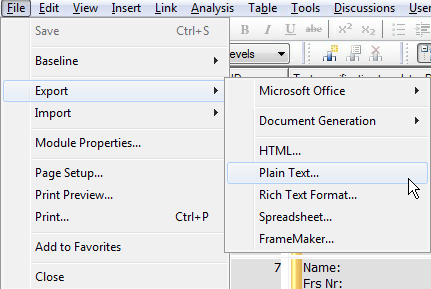
how can i trigger (Execute) that button using DXL. In addition the link provided above is not working.
Re: Running the DXL script using the clicking a button from the menu bar
strathglass - Mon Nov 18 10:52:42 EST 2019
The link can be made to work by changing the front part ... but I forget the details. :(
Search this forum and you can probably find the details.
For the Plain text export, a one-line DXL script can invoke it like this (DOORS 9.6 at least):
#include <C:\Program Files\IBM\Rational\DOORS\lib\dxl\standard\export\plainexp.dxl>
Unfortunately it is an encrypted file so you can only run it. For Word export, they include the unencrypted version: I have used that to make a modified version where you can change the initial GUI settings as you require.
Re: Running the DXL script using the clicking a button from the menu bar
morast - Tue Nov 19 05:02:55 EST 2019
strathglass - Mon Nov 18 10:52:42 EST 2019
The link can be made to work by changing the front part ... but I forget the details. :(
Search this forum and you can probably find the details.
For the Plain text export, a one-line DXL script can invoke it like this (DOORS 9.6 at least):
#include <C:\Program Files\IBM\Rational\DOORS\lib\dxl\standard\export\plainexp.dxl>
Unfortunately it is an encrypted file so you can only run it. For Word export, they include the unencrypted version: I have used that to make a modified version where you can change the initial GUI settings as you require.
Seems root_bar asked a similar question in
If you want to be able to invoke the plain anywhere in a multiple-line script, you can use eval_:
eval_("#include <standard/export/plainexp.dxl>")